
- Joined
- Feb 5, 2024
- Messages
- 3,304
- Reaction score
- 6,711
- Points
- 113
- Website
- esso4k-tv.com
- vip
- 7,298 credits
Offline
Setup Tivimate IPTV Player App on Fire TV devices
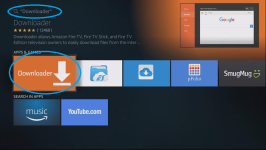
Setup Tivimate IPTV Player App on Fire TV devices"]To install the Tivimate IPTV video player app on your fire TV stick etc, you must first install an app called "Downloader" which can be found at the App Store.
Search for "Downloader" on your device

Download and install the app

After Installation Do not open it yet Click Start button & go to settings which you can find at the top of the screen.
Now scroll to "My device" and Select "Development Options"

Click on Apps from Unknown Sources & Choose Turn On.

Click on Exit and open the downloaded application that we installed
Download :
[HIDETHANKS]
 esso4k-tv.com
[/HIDETHANKS]
esso4k-tv.com
[/HIDETHANKS]
After the download is complete, you will be greeted with a pop-up window. Select Done or OK.
Another pop-up will ask you if you want to Delete it... Click on Delete or Done up to you.
Open the Tivimate apk and select Add Playlist and Click on Enter URL

Enter your m3u URL which should be provided by your IPTV Reseller/ Provider/ Service
and click on next - wait while processing the Playlist.
You can also use bit.ly to shorten the link,
for example, bit.ly (better use a longer name, for security reasons)

User any Name for the playlist, it is optional otherwise you can select done & click on next.
Next step TV Guide (EPG). Choose Enter URL.

Enter or type in the EPG m3u URL (ask your reseller/ provider for the link) you can use bit.ly to shorten the link
Click Next & Done.

Many of the features within TiviMate are not available at the free version.
Example, when you try adding channels to favourites you will get the message to Unlock Premium
To get the Premium Version:
If u don't have an Android device with Google Play Store, you can use BlueStacks emulator for example
[HIDETHANKS]
esso4k-tv.com
[/HIDETHANKS]
Setup Tivimate IPTV Player App on Fire TV devices"]To install the Tivimate IPTV video player app on your fire TV stick etc, you must first install an app called "Downloader" which can be found at the App Store.
Search for "Downloader" on your device
Download and install the app
After Installation Do not open it yet Click Start button & go to settings which you can find at the top of the screen.
Now scroll to "My device" and Select "Development Options"
Click on Apps from Unknown Sources & Choose Turn On.
Click on Exit and open the downloaded application that we installed
Download :
[HIDETHANKS]
Telecharger - Tivimate v2.7 codé en dur
Tivimate v2.7 codé en dur Simple à faire : ne fonctionnera pas avec apkeditor pro ou la plupart des autres éditeurs sans les bons paramètres, FTG Easier Apktool le fait sans problème. ==================== Décompilez en utilisant FTG Easier Apktool avec l'option 2 Dans le dossier smali, utilisez...
esso4k-tv.com
After the download is complete, you will be greeted with a pop-up window. Select Done or OK.
Another pop-up will ask you if you want to Delete it... Click on Delete or Done up to you.
Open the Tivimate apk and select Add Playlist and Click on Enter URL
Enter your m3u URL which should be provided by your IPTV Reseller/ Provider/ Service
and click on next - wait while processing the Playlist.
You can also use bit.ly to shorten the link,
for example, bit.ly (better use a longer name, for security reasons)
User any Name for the playlist, it is optional otherwise you can select done & click on next.
Next step TV Guide (EPG). Choose Enter URL.
Enter or type in the EPG m3u URL (ask your reseller/ provider for the link) you can use bit.ly to shorten the link
Click Next & Done.
Many of the features within TiviMate are not available at the free version.
Example, when you try adding channels to favourites you will get the message to Unlock Premium
To get the Premium Version:
If u don't have an Android device with Google Play Store, you can use BlueStacks emulator for example
[HIDETHANKS]
Telecharger - Tivimate v2.7 codé en dur
Tivimate v2.7 codé en dur Simple à faire : ne fonctionnera pas avec apkeditor pro ou la plupart des autres éditeurs sans les bons paramètres, FTG Easier Apktool le fait sans problème. ==================== Décompilez en utilisant FTG Easier Apktool avec l'option 2 Dans le dossier smali, utilisez...
esso4k-tv.com